Every memorable journey begins with orientation. For a potential Hex Operator, that means opening the Network Builder platform and stepping into its maps. These maps show you where decentralized connectivity could grow, and where you can play a part in shaping its future.
This chapter will guide you through using the Opportunity Map and the Auction Map to explore Hexes, understand their potential, and prepare for the moment you step into bidding.
Step 1: Explore the Opportunity Map
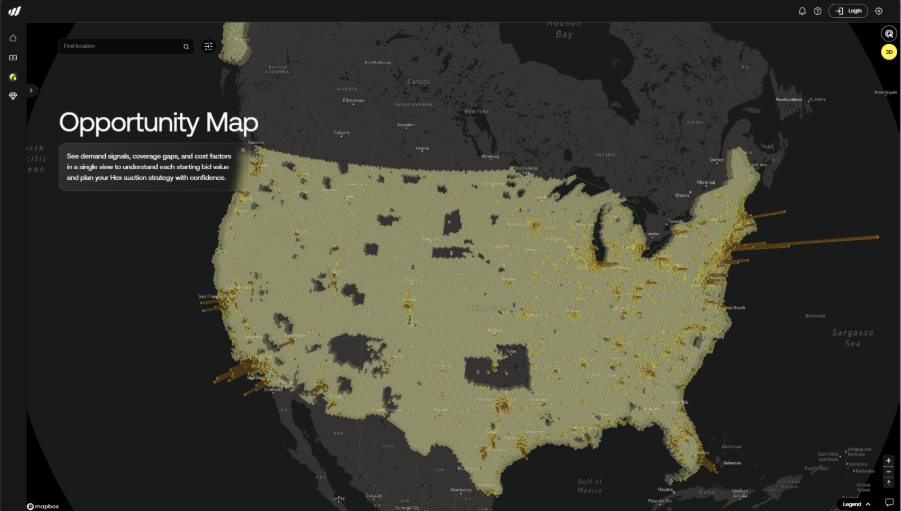
The Opportunity Map provides a live view of all Hexes currently available within the Network Builder platform. It is open to everyone and can be explored without logging in.
Each Hex represents a defined geographic area of approximately 252 square kilometers. Clicking on a Hex reveals planning and infrastructure information used to understand what it would take to operate connectivity within that area.
The data surfaced on the Opportunity Map includes:
- Population density, used for capacity planning
- Building density, used to classify the area as urban, suburban, or rural
- Indicators related to infrastructure scale
- The starting bid for the Hex
These inputs exist to support network planning. They do not represent revenue forecasts, valuations, or financial outcomes. Their purpose is to help prospective Operators understand the relative scale and complexity of building connectivity in different locations.
The Opportunity Map is your planning environment. It is where you survey the terrain before entering an auction.
Step 2: Zoom in on specific locations
Initial Network Builder auctions focus on Hexes located in the United States. You can zoom into any region, city, or area of interest on the Opportunity Map.
A search bar allows you to jump to an approximate location by entering a city's name, address, or landmark. From there, you can identify the Hex that contains that location and explore its details.
Clicking on a Hex opens its details panel, where you can review:
- Population and building density
- Infrastructure scale indicators
- Starting bid
- Current status
Saving Hexes to the Watchlist
From this view, you can add the Hex to your watchlist by clicking on the heart icon.

Hexes saved to the watchlist can be reviewed later from the dedicated watchlist section on the platform.
During the Discovery Phase of Network Builder auctions, watchlist activity plays a key role in shaping which Hexes are prioritized for early auction batches in the subsequent Release Phase. (The three phases of the auction process are outlined in Chapter 3.)
The Starting Bid Formula
Every Hex has a starting bid calculated using a consistent, programmatic formula based on infrastructure requirements.
The starting bid is determined by evaluating two constraints:
- Coverage requirements, which estimate how many AirNodes would typically be needed to provide signal coverage across the Hex
- Capacity requirements, which estimate how many concurrent users the network could support based on conservative technical assumptions
The higher of these two requirements is used to calculate the starting bid, ensuring that it reflects the relative infrastructure scale required to operate connectivity in that area.
The formula used is:
Starting Bid = MAX(
Coverage-based node requirement,
Capacity-based node requirement
) × AirNode Portal hardware cost × 0.005
Population and building data are sourced from census and public datasets and are used only for network planning. The starting bid is not a valuation, revenue estimate, or financial projection.
Step 3: See the bigger picture with 3D
For an additional planning perspective, the Opportunity Map includes a 3D mode.
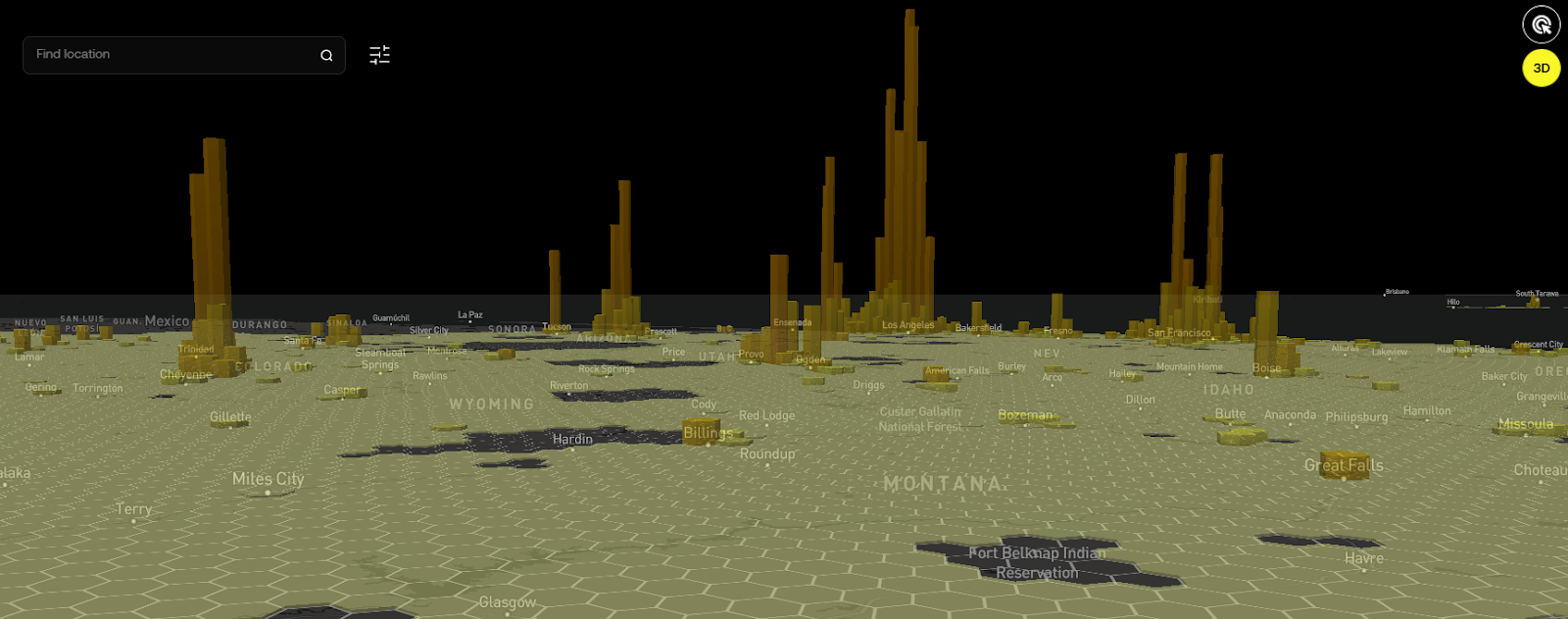
In this view, Hexes rise as vertical columns, allowing you to visually compare areas based on relative scale and clustering. Taller columns indicate Hexes with higher infrastructure requirements or greater planning complexity, while flatter areas reflect lower relative demands.
The 3D view is designed to help you quickly identify dense clusters, regional patterns, and areas where network deployment may require greater coordination. It is a planning and visualization tool, not a representation of financial outcomes.
Step 4: Switch to the Auction Map
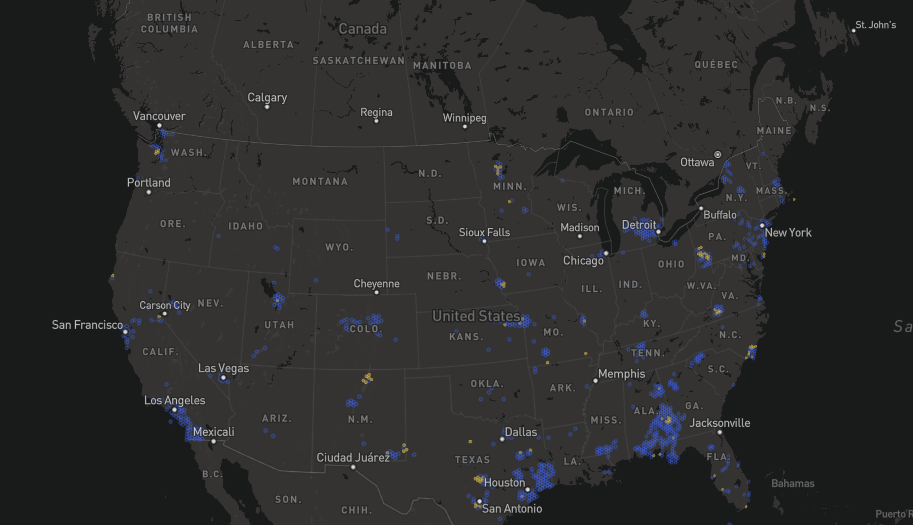
When auctions are live, you can switch to the Auction Map to see active bidding activity.
Unlike the Opportunity Map, the Auction Map displays only Hexes that are currently involved in auctions. This is the live environment where bidding takes place.
On the Auction Map, you can:
- View current bids and countdown timers
- See which Hexes are available, active, winning, outbid, ending soon, or owned
- Track auctions as they progress in real time
Bidding requires connecting a Web3 wallet. Every bid is recorded onchain, making bidding history transparent and visible to all participants. If you are the first bidder on a Hex, your bid starts the auction timer. You may also choose to skip the countdown by selecting the Buy Now option, where available.
Notifications alert you when you are outbid or when auctions are nearing completion.
Step 5: Understand status labels
Whether you are on the Opportunity Map or the Auction Map, clear status tags help guide your choices:
- Available: The Hex is open, and the first bid will start the auction timer.
- Active: The auction is live and has at least one bid.
- Ending Soon: The auction is in its final 24 hours.
- Winning: You are the current highest bidder. Your Hexes will be colored purple on the map.
- Outbid: Another user has placed a higher bid. You need to act to reclaim the lead.
- Owned: The auction is over, and the Hex has been claimed.
- Locked: This Hex is currently unavailable for accepting its first bid. This occurs when the deployed auction batch limit (e.g., 50 live auctions) has been reached. Once all of the active auctions in the batch conclude, each 'Locked' Hex will become 'Available' again.
These signals help you decide where to focus. Do you want the competitive thrill of a trending Hex or the urgency of an auction about to close? The Network Builder platform makes these choices clear.
Step 6: Prepare for the journey ahead
Winning a Hex in an auction makes you a Hex Operator. This is the starting point of your journey, not the finish line.
After an auction closes, winning bidders complete onboarding, including KYC for individuals or KYB for businesses. Wallet connection is required to bid, but verification is completed after winning your first Hex.
Once onboarding is complete, Hex Operators gain access to their dashboards, progression tools, and obligation checklists. From there, work begins across subscriber growth, planning, coordination, and deployment as the Operator progresses through the Network Builder levels.
Closing note
Exploring Hexes is how you learn about the terrain. The Opportunity Map helps you understand infrastructure requirements and plan intelligently. The Auction Map is where preparation turns into action.
Together, these tools ensure that when you bid, you do so with clarity about the responsibility you are taking on and confidence about the work that lies ahead.
In the next chapter, you will learn how to register, connect your wallet, and prepare for your first auction participation.