Your account is ready, your research is complete, and now it’s time to participate. Auctions are the entry point to becoming a Hex Operator. Understanding how they work ensures you can act decisively, track your position clearly, and navigate competition with confidence.
This chapter explains how the auction process fits into the wider Network Builder journey, and then walks through how to place bids, track auctions, and navigate competition once bidding begins.
Understanding the Network Builder auction phases
The Network Builder auction process is rolled out in three distinct demand-driven phases, designed to balance fairness, informed participation, and long-term network growth. Understanding these phases provides essential context before you enter an auction.
Phase One: The Discovery Phase
The Discovery Phase is the starting point of the auction process. During this phase, no live bidding takes place.
The first Discovery Phase was kicked off in December 2025 and ran until the first live auction in January 2026.
In this phase, prospective Hex Operators use the Opportunity Map to explore all available Hexes, research locations across the United States, and save Hexes to their watchlist. Watchlist activity and map engagement are used as demand signals to shape which Hexes are released first once auctions begin.
The Discovery Phase exists to give participants time to learn, compare, and plan before any bidding starts, and to ensure that early auction batches reflect genuine interest rather than arbitrary release order.
Phase Two: The Release Phase
The Release Phase is when live auctions begin. We are currently in this phase as of January 2026.
Hexes are released in batched auctions, with each batch containing a limited number of Hexes. The composition of each batch is informed by Discovery Phase activity, including watchlist interest, geographic clustering, and representation across value tiers.
When a batch of Network Builder auctions goes live, all Hexes on the Auction Map open up to receive bids. 50 separate Hexes can receive first bids in a particular batch, thus launching 50 separate auctions. Once they are kicked off, no new Hex can be bid on until all 50 auctions are complete.
You’re still free to bid on any Hex currently in auction. Only the ability to bid on new Hexes is paused.
When all 50 Hexes have been won, the batch closes, and the Auction Map is temporarily paused until we close out the batch on the backend and ensure that all Hex NFTs are awarded properly. If you’re on the 'Notify Me' email list, you will be informed first before the next auction batch begins.
Phase Three: The Network Expansion Phase
Following multiple Release Phase batches, the auction process will enter the Network Expansion Phase.
During this phase, auction batches continue to evolve over time based on observed demand, operator behavior, and network needs. Additional geographies may be introduced, auction frequency may increase, and a broader range of Hexes may become available as the network grows.
Together, these three phases ensure that Hex supply is introduced in a measured, demand-led way, supporting sustainable expansion of the World Mobile network.
Participating in a Network Builder auction batch: Step-by-step instructions
Step 1: Open the Auction Map
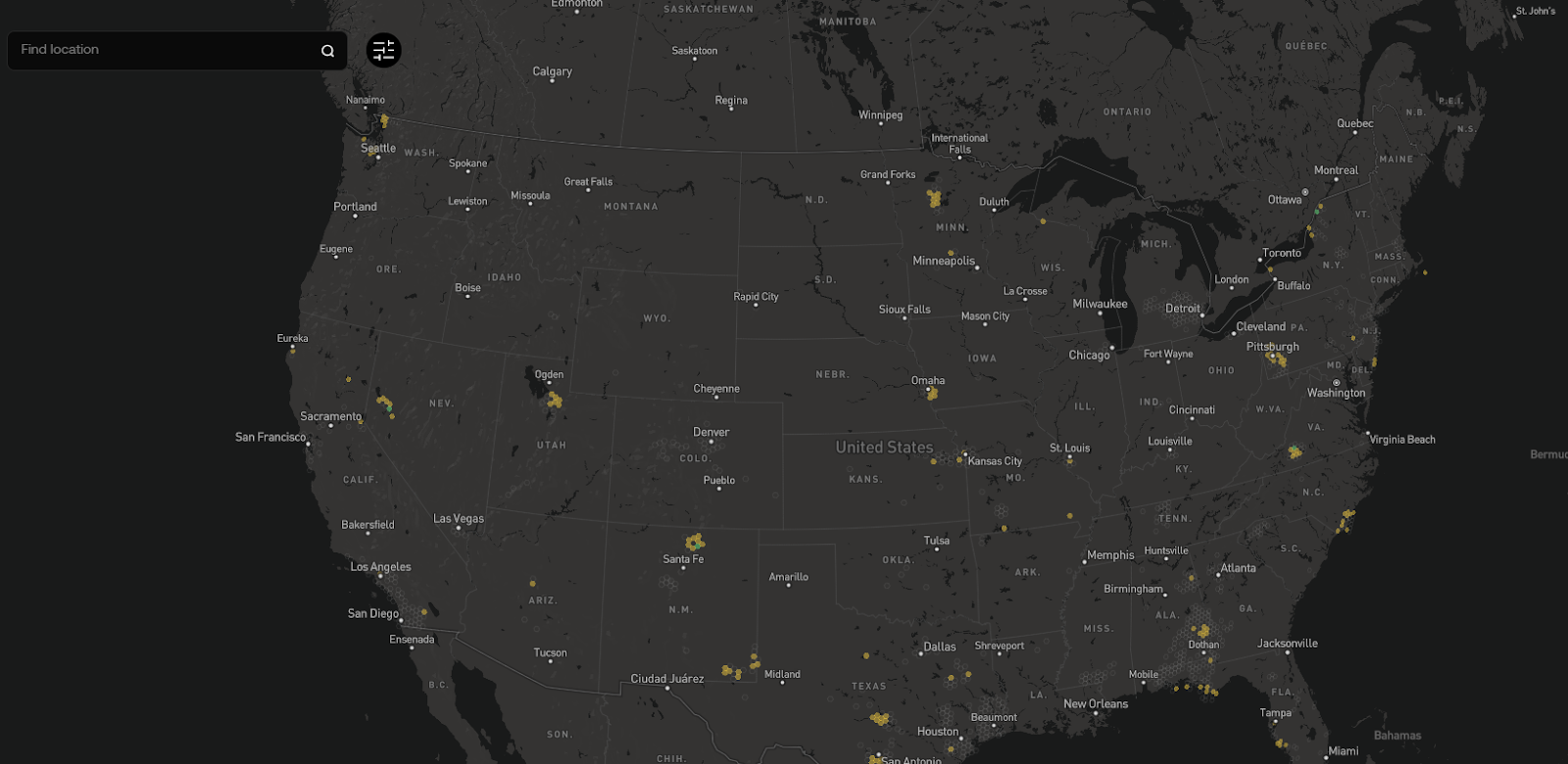
When you receive a notice that Network Builder auctions are live, head to the Auction Map on the Network Builder platform. This view displays the Hexes that are currently available for bidding.
Click on any Hex to open its auction panel. The panel displays the key information you need to decide whether to bid, including:
- Hex ID
- Hex location
- Current highest bid
- Time remaining in the auction
This information updates in real time as bids are placed.
Step 2: Understand how auction batches work
Network Builder auctions run in batches.
Each batch allows up to 50 auctions to be initiated. An auction begins when the first bid is placed on a Hex. Once 50 first bids have been placed in a batch, no new auctions can be started until the batch concludes.
While a batch is active:
- Bidding continues normally on the Hexes already in auction
- Participants can place new bids, increase bids, or use the Buy Now option on any Hex involved the batch
Once all 50 auctions in a batch have concluded, the batch closes. Once we have processed all updates on the backend and ensured that all Hex NFTs have been awarded, a new auction batch launches.
Step 3: Understand auction statuses
Each Hex on the Auction Map is clearly labeled with its current status. These labels help you quickly understand where each auction stands:
- Available: The Hex is open, and the first bid will start the auction timer.
- Active: The auction is live and has at least one bid.
- Ending Soon: The auction is in its final 24 hours.
- Winning: You are the current highest bidder. Your Hexes will be colored purple on the map.
- Outbid: Another user has placed a higher bid. You need to act to reclaim the lead.
- Owned: The auction is over, and the Hex has been claimed.
- Locked: This Hex is currently unavailable for accepting its first bid. This occurs when the auction batch limit (e.g., 50 live auctions) has been reached. Once all of the active auctions in the batch conclude, each 'Locked' Hex will become 'Available' again.
Statuses update automatically as bidding activity occurs.
Step 4: Review bid history
Every Hex includes a complete bid history showing all bids placed during the auction. Each bid links directly to its onchain transaction, providing full transparency.
Reviewing bid history can help you understand how competitive an auction is and how bidding activity has progressed over time.
Step 5: Place your bid
When you’re ready to participate, click Submit Bid on the auction panel.
Placing a bid involves two steps:
- Submit your bid amount on the platform
- Approve the transaction through your connected Web3 wallet
Once confirmed, the Auction Map updates immediately to reflect your position. If your bid is the highest, the Hex status updates to Winning.
Step 6: Compete or Buy Now
If another participant places a higher bid, the Hex status updates to Outbid and you’ll receive a notification. If you have signed up to receive email notifications on the platform, you will receive an email as well.
From the auction panel, you have two options:
- Increase Bid – Submit a higher bid above the minimum required amount
- Buy Now – Instantly conclude the auction by paying the predefined buyout price
The Buy Now option immediately ends the auction and awards the Hex NFT to the buyer.
Step 7: Track your auctions
The platform provides tools to help you stay organized during active batches:
- My Bids – Displays all auctions you’ve participated in, along with your current status for each Hex
- Watchlist – Shows Hexes you’re monitoring, whether or not you’ve placed a bid
These views allow you to follow multiple auctions at once and quickly identify where action is needed.
Step 8: Stay alert with notifications
Auctions move quickly, and timing matters.
Use the notification bell in the top navigation bar to stay informed. Notifications alert you when:
- You’ve been outbid
- An auction is nearing completion
- Your auction status changes
This ensures you never miss an important moment during a live batch.
A sample auction flow
A typical auction may unfold as follows:
- First bid – You place the opening bid on a Hex, starting the auction. Status: Winning.
- Outbid – Another participant submits a higher bid. You receive a notification. Status: Outbid.
- Increase bid – You raise your bid and regain the lead. Status: Winning.
- Back and forth – Bidding continues as the timer runs down.
- Buy Now or conclusion – The auction ends either when a participant uses Buy Now or when the timer expires.
- Award – The highest bidder receives the Hex NFT.
All activity is recorded onchain and reflected in real time across the platform.
Closing note
Placing a bid is where preparation turns into participation. With clear statuses, transparent bid histories, batch-based auctions, and real-time notifications, you always know where you stand.
In the next chapter, you’ll learn what happens after you win: onboarding, progression levels, and how to begin operating in your Hex as part of the World Mobile Network Builder.